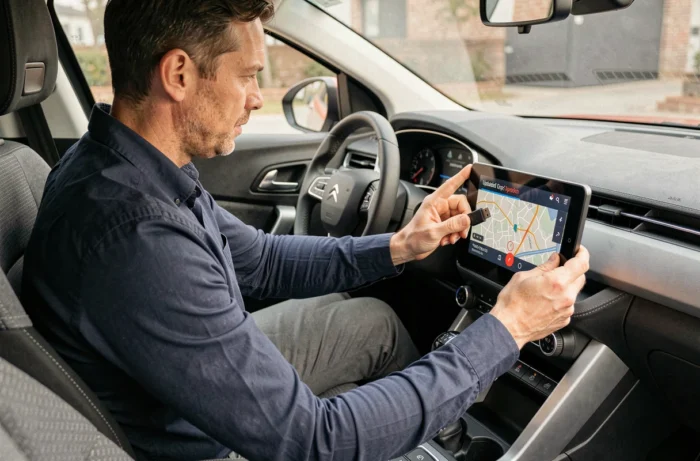
The embedded navigation systems in Citroën vehicles operate with map databases that do not update automatically. Modified roads, newly created roundabouts, revised speed limits: without regular updates, the GPS displays outdated information that complicates daily driving. The procedure for updating the Citroën GPS varies depending on the generation of the multimedia system and the year of the vehicle, which creates some confusion among owners.
Compatibility of Citroën multimedia systems with map updates
Not all Citroën GPS systems update in the same way. The starting point, before any manipulation, is the precise identification of the system embedded in the vehicle. Citroën has equipped its models with several generations of systems (NaviDrive, Connect Nav, and variants depending on the trim), and each system imposes its own file format and storage medium.
Older models rely exclusively on transfer via USB key or SD card. Recent, connected vehicles can receive certain updates directly through the vehicle’s built-in connection, without going through a computer. This distinction is rarely explained in online guides, which treat the procedure as a single block.
To identify the system, the vehicle’s VIN number is the reference. The official Citroën portal requires this number to provide compatible map files. The entire procedure for updating the Citroën GPS relies on this first identification step, which determines the type of medium, the file format, and the expected software version.

Citroën GPS update via USB key: often underestimated technical constraints
Transfer via USB key remains the most common method, especially on previous generations of C3, C3 Aircross, C4, and Berlingo. The procedure seems simple at first glance, but several technical constraints lead to recurring failures.
Formatting and capacity of the USB key
The key must be formatted in FAT32, a file system that limits the size of individual files. Complete European map files sometimes exceed this limit, requiring the download to be segmented or a key of sufficient capacity to be used. A recognized brand USB 3.0 key reduces the risk of reading errors by the embedded system.
- Check that the key is empty before copying the files (no residual folders, no hidden operating system files)
- Do not rename the files downloaded from the Citroën portal, as the embedded system identifies them by their original name
- Avoid USB hubs or extensions: plug the key directly into the vehicle’s USB port
- Keep the engine running throughout the installation to avoid a power cut
Frequent error messages and real causes
C3 Aircross users regularly report failure messages during transfer. In most cases, the problem arises from an incompatibility between the software version of the multimedia system and the downloaded map version. The system software sometimes needs to be updated before the mapping, which the official portal does not always clearly indicate.
Another common pitfall: downloading maps from a browser that interrupts the transfer midway. The corrupted file goes unnoticed on the computer but causes an error during installation in the vehicle. Checking the integrity of the file (size matching that indicated on the portal) before copying it to the key avoids this situation.
Remote updates on connected Citroëns: what really works
Recent models equipped with a built-in connection can receive updates without physical media. The vehicle downloads the files via the mobile network and prompts the user to accept the installation from the multimedia system menu.
In practice, remote updates mainly concern software patches for the system. The complete mapping, which is larger, is not always distributed through this channel. Field feedback varies on this point: some owners report receiving partial map updates in connected mode, while others only have access to system patches and must use the USB key for mapping.
To check if an update is available in connected mode, you need to access the multimedia system settings, then the “System Update” section. The vehicle must be parked, engine on, and connected to the network. The installation can take several minutes depending on the volume of files.
Duration of Citroën map support: a gray area for owners
One aspect rarely addressed is the duration for which Citroën maintains available map updates for a given model. Manufacturers do not communicate a single, explicit duration of support for navigation updates. Security-related patches for the system are generally followed over long periods, but mapping may cease to be updated well before the vehicle’s end of life.
The available data does not allow for a precise conclusion regarding Citroën. Owners of models that have exceeded a certain age find that the files offered on the official portal are no longer updated. The system remains functional, but with maps frozen at their last available version.
This situation raises the question of the real cost of embedded navigation over the vehicle’s lifespan. Map updates are not free on all models, and their price varies depending on the chosen geographic coverage (France only, Western Europe, complete Europe).
Comparing the cumulative cost of updates with a smartphone navigation solution (Android Auto or Apple CarPlay, available on most recent Citroëns) is worth considering before renewing a map subscription.
The integrated GPS retains the advantage of native display on the vehicle’s screen and integration with steering wheel controls. For drivers who regularly travel through changing areas (new infrastructures, prolonged work zones), keeping the mapping up to date remains relevant, provided that it is verified that the model is still actively supported by the manufacturer.